Présentation au French Global Chapter

Je présenterai le 12 juillet en ligne au Pass Global French Chapter sur les entrepôts de données. Voici les détails de la session :

Inscrivez-vous à Modernisez votre entrepôt de données avec SQL Server 2014 et HDInsight le 12 juil. 2014 13:00 EDT ici :

https://attendee.gotowebinar.com/register/3298516551114248449

Les architectes d'entrepôts de données font face à plusieurs défis dû à l'apparition de nouvelles sources de données et des besoins de plus en plus pressants des utilisateurs. Cette session démontrera les nouvelles fonctionnalités qui s'offrent aux architectes/désigners d'entrepôts de données avec SQL Server 2014 et Microsoft Azure HDInsight.

Conférencier: Christian Coté

Une fois inscrit(e), vous recevez un e-mail de confirmation contenant les informations relatives à la procédure d'accès au webinaire.

L'inscription est gratuite. Je vous y attend!

Very good article on how BI works in 2014


I found that article recently and I found it interesting. It describes how IT and business interact together. Also, it points out how new technologies like in memory models in spreadsheets (read PowerPivot) should be used. I presented many times on PowerPivot and, being a data warehouse (back end) specialist, this article resume pretty much my thoughts on how the new end user tools should be used.

I use a strategy similar to the one outlined in the article with some of my clients and it works very well. It allow me to deliver data quickly to the users and once they see their data, it’s easier to extract requirements or stories from them. They are able to better show us what they want. And, we can deliver their data in a snap, knowing that this is not the final solution. At least, we can work on integrating the data they will use and we can let them prototype with data that they are not sure to use at the end of the day.

Hope you’ll find the article interesting as much as me!

Christian

Microsoft BI Certified Master and Architect

As Marco Russo states in this post, MCA and MCM certifications would be very beneficial for the Microsoft BI community. I encourage everyone to follow what Marco ask and tell Microsoft that these certifications are needed. So, if you are interested, send an email to advcert@microsoft.com and tell them that we need theses certification. This will help the industry to become more mature with Microsoft BI.


Christian Cote


#ssas #mcsm #sqlserver

Renewed SQL Server MVP 2012

I received the anticipated email this morning telling me that I have been renewed as a Microsoft Most Valuable professional (MVP) for another year. It's the fourth tim that I get this award. It represents a lot of work to keep it keeps me motivated to  always learn new technologies.

Hope to celebrate my fifth year as an MVP in 2013!


Christian

SSIS 2012 item with same key as already been added error

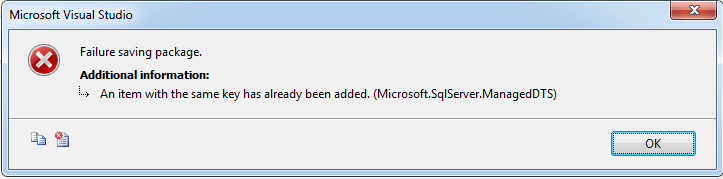
I am in the process of converting an existing SSIS solution that I use for my demos. I converted my packages to project (SSISDB) deployment model as opposed to package (file system) deployment model. While doing the conversion, I encountered the following error when I tried to save one of my package.

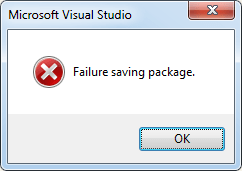
Pressing on OK led me to the following error message:

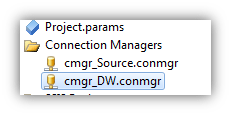
I had hard time figuring out what was causing this error. Then, reading the first error message, I looked at where in my package I might have used the same name. It was not obvious but I noticed that I had previously converted connection managers of a package to project connection managers. Then, when I opened my other package, I had duplicate object names

  • cmgr_DW package connection manager:

  • cmgr_DW.connmgr project connection manger.

Project connection managers are assigned to all packages in the project. I deleted the package connection manager in my package I tried to save:

And the project connection manger appeared replacing the package one with the same name.

I did the same for my other package connection manager and I finally been able to save my package in the project.

In conclusion, connection manager’s name must be exclusive between package and projects. You can use the same name for package connection managers across many package but they cannot conflict with project connection managers. This makes a lot of sense when we think to it but the error message not obvious to decode at first J.

Learn About The Microsoft Private Cloud to Win a Trip for Two to Mexico!

Microsoft has released new and exciting products that will change the way IT Pros utilize Virtualization and Microsoft Private Cloud solutions.   Two products which are a part of these great changes are the newly released System Center 2012 and the soon to be released Windows Server 2012.  Both of these solutions were designed to make virtualization and extending to the private cloud simpler and much more efficient. 


With these new changes to Infrastructure and the IT world, it’s a great time to learn about these new solutions and keep yourself and your organization ahead of the curve in terms of where technology is headed.  In fact, Microsoft has even added an incentive to learn about their Private Cloud solutions through the Skyrocket Sweepstakes! 


Entering is easy!  All you have to do is
register, and then download a free TechNet evaluation like Windows Server 2012 RC or System Center 2012 to get started.  Every applicable evaluation you download gives you an entry into the sweepstakes! And the best part is the more evaluations you download, the better your chances.  And what’s the prize you may ask? Oh, just a 7 day, 8 night trip for two to Cozumel, Mexico!


The contest ends September 6th so don’t wait!  Register now!

Don’t miss Montreal SQL Saturday tomorrow!

Tomorrow at CRIM building a conference on SQL Server Server 2012 will take place. I will have the pleasure to talk about BISM Tabular. Here is an abstract of tomorrow’s agenda:

9:00 : Introduction

9:15 : Nouveautés T-SQL

Cette session fera le tour des nouveautés les plus marquantes du T-SQL. Venez voir comment bénéficiez des Sequence, Lag, Lead, First_Value, Last_Value, Try_Convert, Parse, Try_Parse

Conférencier : Éric Moreau

10:00 Pause

10:15 : Analysis Services 2012 Tabular Models

Cette session explique et démontre Analysis Services 2012 Tabular et quel est son rôle dans une stratégie BI. Les différences d’utilisation entre ce produit et Analysis Services Multidimensional (UDM) seront aussi abordées.

Conférencier : Christian Coté

11:00 SQL Server 2012 Performance and Tuning (Session en anglais / English session)

This session will talk about various topics that have been improved in SQL Server 2012:

– Database Tuning advisor

– Column store indexes

– Online index create, drop and rebuild

Conférencier : Michelle Gutzait

12:00 – 1300 : Lunch

13:00 : SQL Server AlwaysOn

Cette session présentera la nouvelle option de haute disponibilité AlwaysOn de SQL 2012.

Conférencier : Pollus Brodeur

14:15 : Pause

14:30 : Nouveautés SSIS

SSIS 2012 regorge de nouveautés et d’améliorations, que cela soit le volet développement et déploiement. Cette session aura pour but de vous dévoiler un aperçu de ce qui vous attend dans cette version 2012.

Conférencier: Thomas Riquebourg

You can register now on tomorrow before the conference.


Hope to see you there!

Christian

Power Pivot 2.0 drill through issues resolved

I've been working with Power Pivot quite a bit lately and I encountered the following drill through problems:

The LocaleIdentifier property is not overwriteable and cannot be assigned a new value 

That error only happened when my users tried to use a PowerPivot Excel workbook that I created for them. On my workstation, it worked just fine. The problem was that my OS regional settings are different than those of my users. Mine are Englidh US and my ciustomers are set to French Canada. So, the problem is the dot (.) vs the comma (,) difference in the decimal separator.

When I imported my users flat files in PowerPivot , I did not clicked on the advanced button that would have allow me to set the language settings in which I would like to import the files. So, I had three solutions:

  1. Change the OS regional settings of my users: since their regional policies are based on a corporate policy, which was not an option.
  2. Change the decimal delimiter of my user's computer: for the same reason stated above, that was not an option too.
  3. Re-Import the files using the correct language: that`s what I did. Fortunately, I had only 2 small flat files, it took me few minutes to do it but if I had many more files, I would have been in trouble.

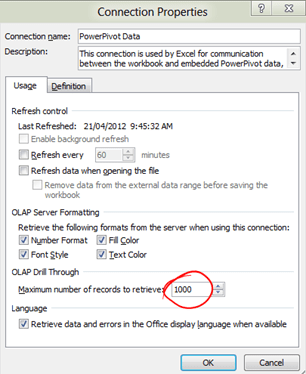
Only 1000 lines are showing in the drill through results

My users wanted to see more than 1000 rows while drilling though their Power Pivot table. Resolving that issue was very simple: l went in the connection's properties and changed the value to whatever was needed

So, that's it for today. I hope those tips will help you some day.

Blog at WordPress.com.

Up ↑