Burlington user group presentation July 29th

I made a presentation yesterday at Burlington .Net user group on SSIS. It was about the same presentation I gave last week at Ottawa.

There were about 12 attendees and I had good questions and comments while I was presenting. Even though it was a level 200 presentation, I hardly tried to refrain my enthusiasm on SSIS and It ended up being a level 250-275 demo :-).

Now its vacation time for the presentations. I will be back on this in September or later. Since I am co-leader of Montreal .Net user group for SQL Server along with Eric Moreau, I will be busy seeking for presenters this fall on SQL Server BI.

Christian

Labels:

Ottawa SSIS presentation July 23rd


Yesterday, I did a presentation on SQL Server Integration Services (SSIS). It was an introductory demo of the toolset and there were around 33 attendees. I showed them why using SSIS and how its various components make it “the” tool when it comes to data movement.

Here is my skydrive’s link to the powerpoint slides.

I will present the same demo next week at Burlington user group.

Christian

Labels:

VSTS4DBP import script gotcha

While importing a DDL script recently, I encountered the following gotcha:
DimCustomerBadFormatted
My imported script was not formatted correctly as it is when I import the objects from database. To correct the formatting, first I had to deploy the objects to the database. Second, I deleted objects from my project. Finally, by doing a schema comparison between the database and the project, I was able to re-import the database objects. This time, the scripts were both correctly formatted and stripped:
DimCustomerWellFormatted
This gotcha did not prevent the project to properly deploy nor did it caused VSTS4DBP to malfunction. I found it more annoying to have scripts formatted differently in my DB project. It is also worth mentioning that this also happens when a column is renamed; if the new name’s length is different than the previous one,the script format will not be adjusted and the columns will be misaligned.
Christian

Labels:

VSTS4DBP create schema behavior

I recently had to reorganize a database. Basically, I needed create new schemas and to move tables into them. Having a pretty good knowledge of VSVS4DBP, I decided to make usage of its refactoring capability of moving tables to another schema. This article will describe my journey into schema management in VSTS4DBP.

1- The problem : schema creation

The first thing I did was to create a new schema. Pretty strathfoward; I just right clicked under Schema objects –> Database level objects –> Security and selected add new item from the contextual menu. The following dialog box appeared:
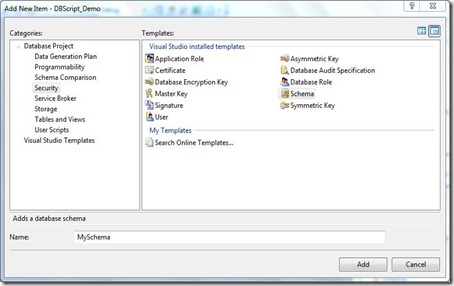
Schema creation 
I named my schema "MySchema" and … nothing! I expected to have the folder created into the solution explorer but the only thing I got was the "MySchema.sql" file that was created in the security folder:
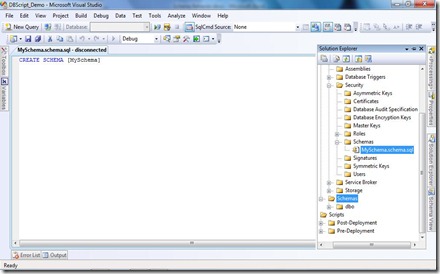
SchemaNoFolderStructure 
I then thought that maybe I was not at the right place to create my schema. I tried to create it from the schema view pane and I ended up with the same result. Still, the newly created schema was visible in the schema view pane though:
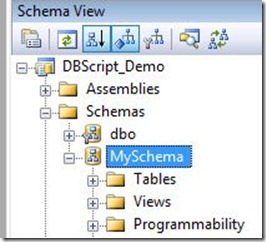
Schema - schemaview 

2- Move a table

I tried then to move a table to the newly created schema. The table has been moved at the right place according to the schema view pane but, still, the folder structure was not created in the solution explorer. And, worst, in the solution explorer the table stayed in its original schema. I could only find its real schema by opening the SQL script as you can see in the following screen captures:
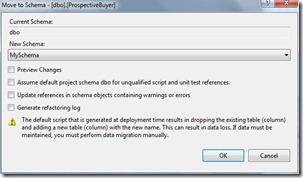
MoveSchema

I use refactoring capability of VSTS4DBP to move dbo.ProspetiveBuyer table
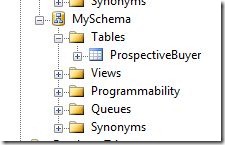
Moved

The table appears to be moved in schema view pane.

MovedNoSolutionExpl

Not in solution explorer though…

3- Deploy the database

I then built and deployed the database project without deploying to the physical database, I simply ask VSTS4DBP to create a SQL script file. From the deployment perspective, everything seemed to be normal. My schema has been created and the table I refactored was in the newly created schema. I then tried to close and reopen solution but it looked like it was impossible to have the folder structure created in either the solution explorer or the windows explorer.

4- Solution: create a new table

I then tried to create a new table in the schema to see where VSTS4DBP would create it. And then voilà! The folder structure got created in windows explorer and appeared in solution explorer.
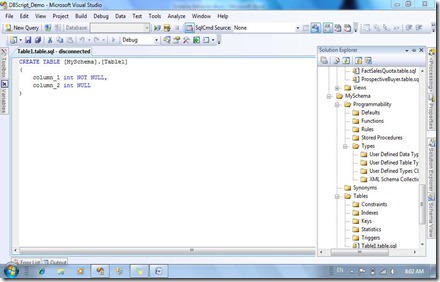
createtable schema appears
So here are my conclusions:

  1. Adding a new schema does not create the whole structure unless a table is created (not moved) into it.
  2. Refactored (moved) tables are only moved in their SQL scripts, not physically in either Solution or Windows explorer. You have to move them to the target folder manually after refactoring.

It is pretty simple once you know it but it took me a lot of time to discover these "features".

Labels:

Montreal Code Camp – WOW!

I am writing this article on my way back returning from Montreal Code Camp. This event was held today (May 30, 2009). It has been, IMHO, a complete success! There were great presenters and I found the concept behind the various presentations: 40 minutes each. Since presenters do not have to dig a lot into their subject, I think that it allowed more sessions and provided insights on new technologies. This was a bit frustrating for us, speakers because usually our presentations are made for 75-90 minutes sessions. We had to cut corners and adjust our presentations.

I have been lucky to present at 8:30 AM so I had the whole day to enjoy all other presentations. One of them was particular: how to optimize our reading speed by Mathieu Tanguay. This one was I think very well appreciated by attendees. That said, all presentations I attended were very well done.

Vancouver DevTeach is next on my schedule! I have to refine and optimize my presentations for this event. I'll update this blog while being there for sure!

Christian

Speaking at Montreal code camp on May 30st

I will be speaking at Montreal code camp next weekend. The code camp focus on best practices. I will do an early session on best practices on deploying database using Microsoft Visual Studio Team System for Database Professionals (VSTS4DBP). In brief, I will talk about :
– Bringing the database into VSTS4DBP
– Manage and deploy DB versions
– Unit test DB deployment
Check out the complete schedule at :
http://www.codecampmontreal.com
Hope to see you there!

Presentations material

Here are my powerpoint presentations in PDF format used to speak about Visual Studio Team System for Database Professional 2008. I used it while giving the following presentations:

Here the skydrive link for the file.


Also, I gave an SSIS presentation earlier this year:

Here the skydrive link for the file.

I intend to post other presentation material such as solution source files for VSTS4DBP pretty soon, stay tuned!

SSIS configuration wizard gotcha

In all my applications, I use SQL Server configurations coupled with one indirect configuration. The latter brings me connection string for a connection manager which, in turn, enables my packages to use SQL Server configurations. This is what I call "hybrid" configuration.

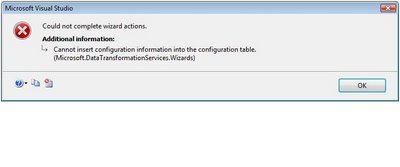
A couple weeks ago, I ran into the following problem. I was trying to enter a connection string for a connection manager into my SSIS configuration table and I had this error message:

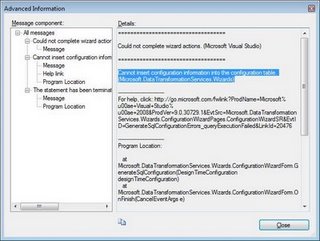
Clicking on the show technical details icon (rightmost icon at bottom of the error window), led me to this screen:

I highlighted the problem. Basically, the message tells me that the value to be inserted is too long. By default, SSIS creates a configuration table with NVARCHAR(255) columns. The problem I was facing is that when SSIS configures a connection manager connection string, it appends the application name to the connection string. So, my problem was that SSIS tried to insert a value that was longer than 255 characters into the configured value column. In order to get rid of the error, I had two choices:

  1. Make the configured value column larger than 255 characters.
  2. Remove the application name from the connection string

The application name is an optional parameter that is added to the connection string by SSIS connection manager. It looks like this:

"Application Name=SSIS-StgTemplate-{EE44D17C-AD8C-48E5-B8EB-8197272EE4C0}.\DEV2008.StgDb;"

It is useful when you want to trace SQL connections and distinguish among all active connections on your server. Since the application's name is, for me, superfluous information (I am not running concurrent ETL applications and most of the time, they run on a dedicated server), I decided to use the option #2 and my problem was resolved!

Devteach/SQLTeach conference: fantastic training opportunity

Last week, I had the chance to present at DevTeach/SQLTeach in Montreal. My presentation was on deployment and  testing of a database project using Visual Studio Team System for Database Professional (VSTS4DBP). It went well and I think that several attendees learned how powerful VSTS4DBP can be. It was a level 300 session but I personally think that it could have been rated level 400 session.

I attended several one-two days conferences in the past but nothing surpasses the level of learning opportunity like DevTeach/SQLTeach. Three days there worth lot more than three single days conferences that we can attend at product launch for example. There are many session hat cover a wide range of technologies. The ratio attendee/speaker is very low compared to other conferences like PDC, Tech-Ed, etc. Most of the time, the speaker is always available for questions or discussions even after its scheduled session. In short, DevTeach/SQLTeach is lke three full days of training with skilled speakers that present products used in real life situation.

Its worth mentioning that the DevTeach party was very fun too! 🙂

Hope to see you at future DevTeach/SQLTeach conferences whether it would be in Montreal, Toronto or Vancouver!

Blog at WordPress.com.

Up ↑