Role membership with VS 2010 Database development tools

One question that arises when it comes to database deployment is how do we deal with role memberships. The sample answer is; create a file that ends with .RoleMembership.Sql and VS2010 will automatically use it’s content.

The easiest way to do it is to create the role in the database using sp_addrolemember and retrofit the added roles in the database project by using a schema compare feature. Simply specify database as source and db project as target and use the “write update” button to have the file created at project level.

This is not ideal since roles can differ from one server to another. In a future post,I’ll describe some solutions or ideas on how to handle this situation.

Christian

My Christmas gift will arrive mid-October!

EXO

I pre-ordered an EXOPC slate yesterday. It will ship around October 15th. I can't wait to have it. I preferred this slate over the IPad for several reasons but the major one is because this is a real computer. And, since it runs Windows 7, I can install any program I want on it. Tests with prototypes seem pretty good from what I seen on YouTube and based on feedback on their forum, ordering this slate was a no brainer.

Now, I just have to wait…the toughest part of the pre-ordering process J.

Visual Studio Database Development Tools guide

The visual studio team published a Visual Studio Database Guide on CodePlex.

(From Codeplex page)

“Practical guidance for Visual Studio 2010 Database projects, which is focused on 5 areas:

  • Solution and Project Management
  • Source Code Control and Configuration Management
  • Integrating External Changes with the Project System
  • Build and Deployment Automation with Visual Studio Database Projects
  • Database Testing and Deployment Verification”

I encourage anyone who wants to learn or have deeper knowledge on to download and read this document. It is very well done and contains all you need to know (and even more) on VS2010 Database Development tools.

Christian

Installing Oracle XE on Windows 7 64 bits

Today, I want to share my experience about installing and accessing an Oracle Express (XE) 10G R2 database. The installer is pretty simple and everything seems to be working as soon as the installation finishes. From the database home page that opens at the end of the installation process, I have been able to unlock "HR" account and see its database objects.

Since one of my goals of installing Oracle XE is to use it with Visual Studio, I started V2010. I then created an Oracle database project and try to connect to my local XE instance. I then questioned myself: "What is the name of my Oracle database instance?" Simple enough, I opened the TNSNAME.ORA located in my "C:\oraclexe\app\oracle\product\10.2.0\server\NETWORK\ADMIN" folder:
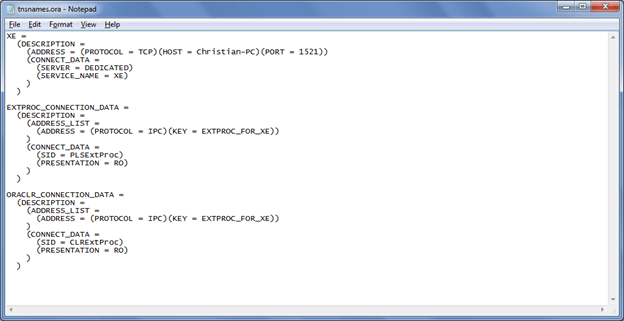
From the first line, I can see that the instance name is "XE" and my server name "Christian-PC". So, I tried to connect to my instance using "Christian-PC/XE" (without the double quotes). I got the error "ORA-12154: TNS:could not resolve the connect identifier specified". I was a bit puzzled by this, so I went to command window and started the old SQLPLUS and I was able to connect to Oracle.

So, what was the problem with VS2010? I tried VS2008 with same results. I googled for VS and Oracle XE connectivity. So I thought that I needed to install Oracle client. But, as per Oracle web site, th client is not needed if I use the local server on my local machine .It seems that people using Windows 32 bits did not have any problem connecting to Oracle from VS without client installed.

Finally found out that I needed to install ODP.net on my machine in order to have it working with VS on a 64 bits machine. So, I downloaded and installed it with all default options and:
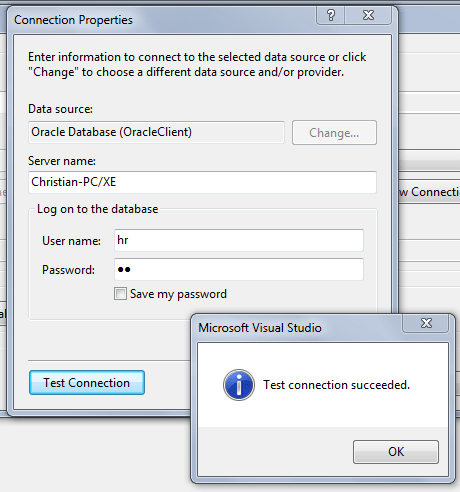
Now, I'll be able to test Toad Extensions for Visual Studio! I send other post(s) over the week on it.

Christian

Manage Oracle Database with Visual Studio Database Development Tools

Oracle databases can now be integrated with your visual studio solution. Quest Software made a product: TOAD Extension for Visual Studio that enables Visual Studio 2010 Database Development Tools (aka DBPro, VSTS4DBP or datadude) to create database projects based on Oracle database. There is a freeware version of the extension which has limited functionalities compared to the commercial version, but still, you are able to create db projects with it.

I tested this extension and it works great. I’ll surely blog over the next few weeks about my “user experience” with this product.


Christian

Ottawa Code Camp presentation

I just finished my presentation at Ottawa Code Camp on VS2010 Database development tools. There was about 20-25 attendees there and I had to answer some interesting questions. I have a lot of admiration for the attendees that invest a whole Saturday on a weekend to learn something new that might help them further long in their career.

Christian

Presenting at Ottawa Code Camp on VS2010 ALM

I will have the pleasure to present at Ottawa Code Camp Saturday April 17th. I will talk about Visual Studio 2010 ALM Database Development Tools (Application Lifecycle Management; formerly known as Team System for Database Professional, Datadude, DBPro, etc. J). I will demonstrate DBpro’s new features, version management of databases as well as its new capability of managing Oracle database thanks to Quest Software Oracle DSP.

Hope to see you there,

Christian

Presented at Montreal SQL Server user group

Tonight, I presented on how SSIS can interact with a SSAS Cube. In short, I talked about the following topics:
– The various way to process a cube from SSIS
– How cube data can be integrated into an SSIS package to be reused in other part of a Datamart or any other system.
I’ll surely blog about these topics pretty soon.
Christian

SSIS Performance counters link

I always wanted to find a practical explanation on how to use performance counters and, most important, their definition. I am a SQL Server Central subscriber and in one of their articles, I found this link. It explains very clearly the various counters that are available by SSIS pipeline. So, next time I need to investigate on a performance problem while loading data with SSIS, I’ll know where to find performance counters information’s.

Christian

Blog at WordPress.com.

Up ↑