Presenting at Ottawa IT Camp

I’ll be presenting in Ottawa IT Camp this Saturday. I will make two sessions:

  • SSIS Whats new in SQL Server Denali?: This session will talk about next release (CTP1) of SQL Server Integration Services.
  • Deploy your database with VS2010 Database Development Tools: I will talk about database deployment with TFSBuild.

Hope to see you there!

Christian

Presenting at Montreal DevTeach/SQLTeach

I’ll be presenting at next SQL Teach. I’ll do two presentations on the following topics:

  • Advanced ETL application concepts with SSIS: this session will be done with the next release of SQL Server CTP1 concepts in mind.
  • Manage your database with Visual Studio 2010: this session will be upgraded with SQL Server Juneau’s public bits available at that time.

Hope to see you there!


Christian

VS 2010 ALM Database Development Tools becomes SQL Server “Juneau”

Database development tools are now covered by SQL Server team. "Juneau" should be available in the next release of SQL Server CTP (2) called "Denali". Database development tools already available in VS2010 will be converted to "Juneau" when SQL Server "Denali" will be RTMed. All functionalities available right now will remain or will be enhanced. TFS branching and build will continue to work. So, for now, it's business as usual. But I can't wait to get SQL Server Denali CTP2 to further talk about it.

Here is the Microsoft link to find more information's on it.

Christian

SSIS Denali (2011 – 2012)

SSIS will change quite a lot in Denali. In the next few weeks, I will blog about it. My goal is to share with you how a simple BI solution can be built with SSIS 2011. The solution is comprised of the following SSIS projects:

  • Control: Contains the master package. Execute package task has changed a lot in SSIS 2011.
  • Staging: Contains packages that load the staging tables.
  • DW: Contains packages that load the data warehouse tables.

So, I will be able to assess how a seasoned developer can navigate in the new SSIS Denali paradigm.


Christian

VS2010 Database Development Tools dependency resolution

Today, I am talking about how VS2010 Database Development Tools resolved a potential “Catch22” dependency resolution. To start with, here is the problem:

I have a database that has dependencies on another database. I will call then “Source” and “Main” database. “Main” database being the one that has dependencies on the “Source” database. Since I did not like to have explicit reference to “Source” database in my “Main’ database, I created synonyms for all objects that needed to be referred into the source database.

So, I have synonyms that go like this:

CREATE
SYNONYM
[Main].[DimCustomer]
FOR
[$(AdvWorkLt)].[DW].[DimCustomer];

CREATE
SYNONYM
[Main].[DimProduct]
FOR
[$(AdvWorkLt)].[DW].[DimProduct];


The [$(AdvWorkLt)] is a SQLCMD variable in my database project that points to my Source database:
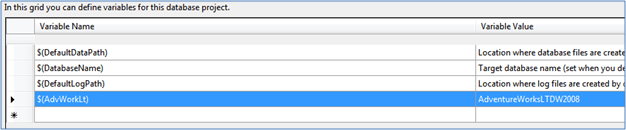
Next, I created views on top of these synonyms:

CREATE
VIEW
[dbo].[DimCustomer]

    AS
SELECT
*
from
[Main].[DimCustomer]


Since I did not like to do a “Select *” in my view, I used the refactoring capabilities of Database Development Tools to expand the wildcard:
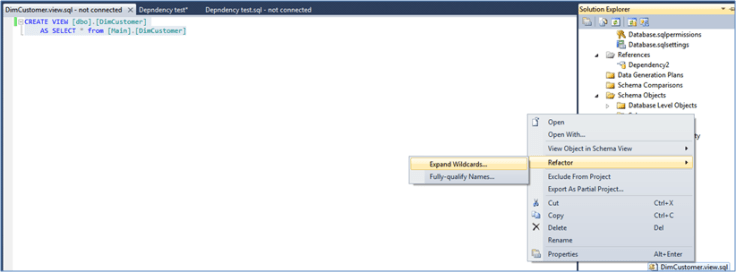
The refactoring action gave me the following SQL:

CREATE
VIEW
[dbo].[DimCustomer]

    AS
SELECT
[Main].[DimCustomer].[IDCustomer],

     [Main].[DimCustomer].[CustomerID],

             [Main].[DimCustomer].[Title],

             [Main].[DimCustomer].[FirstName],

             [Main].[DimCustomer].[MiddleName],

             [Main].[DimCustomer].[LastName],

             [Main].[DimCustomer].[Suffix],

             [Main].[DimCustomer].[CompanyName],

             [Main].[DimCustomer].[ADWSalesPerson],

             [Main].[DimCustomer].[EmailAddress],

             [Main].[DimCustomer].[Phone],

             [Main].[DimCustomer].[CustomerEffDate],

             [Main].[DimCustomer].[CustomerEndDate],

             [Main].[DimCustomer].[CustomerCurrent],

             [Main].[DimCustomer].[LoadID]


FROM
[Main].[DimCustomer]


Now, I questioned how the project would looks like when it would create a deployment script. To be honest, I had some doubts on how Database Development Tools would be able to render the dependencies between the synonyms and the views. I was in for a pleasant surprise because the dependencies has been resolved perfectly in the resulting deployment script:

PRINT
N’Creating [Main].[DimCustomer]…’;


GO

CREATE
SYNONYM
[Main].[DimCustomer]
FOR
[$(AdvWorkLt)].[DW].[DimCustomer];


GO

PRINT
N’Creating [dbo].[DimCustomer]…’;


GO

CREATE
VIEW
[dbo].[DimCustomer]

    AS
SELECT
[Main].[DimCustomer].[IDCustomer],

     [Main].[DimCustomer].[CustomerID],

             [Main].[DimCustomer].[Title],

             [Main].[DimCustomer].[FirstName],

             [Main].[DimCustomer].[MiddleName],

             [Main].[DimCustomer].[LastName],

             [Main].[DimCustomer].[Suffix],

             [Main].[DimCustomer].[CompanyName],

             [Main].[DimCustomer].[ADWSalesPerson],

             [Main].[DimCustomer].[EmailAddress],

             [Main].[DimCustomer].[Phone],

             [Main].[DimCustomer].[CustomerEffDate],

             [Main].[DimCustomer].[CustomerEndDate],

             [Main].[DimCustomer].[CustomerCurrent],

             [Main].[DimCustomer].[LoadID]


FROM
[Main].[DimCustomer]

GO


In conclusion, VS2010 Database Deployment Tools is able to resolve object dependencies gracefully. I was a bit skeptical about it but now, I am convinced more than ever that this is the best tool to manage databases.

Use Quest Toad Extension to manage your Oracle database (part 1)

Today I will talk about how you can manage Oracle with Toad Extension plugin for Visual Studio 2010 database development tools. As mentioned in a previous post, this plugin had two flavors; freeware and commercial. The following table shows the differences between both versions.

Features

Commercial

Freeware

Create Project

X

X

New Item templates

X

X

Import Schema

X

X

Import Script

X


Deploy to Database

X

X

Deploy to Script

X


Schema Compare

X


Data Generation

X


Unit Testing (v1.1)

X


Refactor

X


Table Editor

X


Property Grid

X

X

Schema Viewer

X

X

Dependency Viewer

X


TFS Headless Build

X


Source Control Integration

X

X


Usage

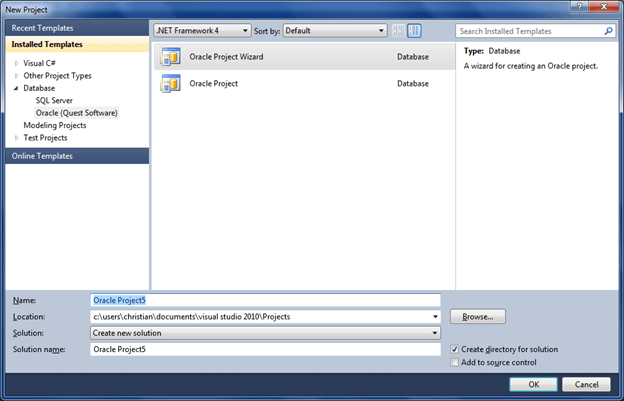
The extension is easy to setup and its usage is much like SQL Server counterpart. Once installed, there is a new menu item in VS2010:

Like SQL Server, there is a wizard that helps you setting up a database project and optionally imports an existing schema (User) structure.

Solution explorer

Schema import

Once the project has been created, you can reverse engineer an existing schema. Even though you used the project wizard, you can import several schemas to the project. And, one thing you need to be aware of is that the current version of the extensions will not prevent you to import one schema twice. The team knows about this and it should be corrected pretty soon.

Project properties

The project properties are very simple in a sense that they are limited compared to what we have with SQL Server. This can be very easy to explain since we are at V1.0 of the product. One thing I would like to have is the option to drop or not existing objects in the database if they do not exist in the project.

Folders and files

One thing I like a lot is the comment folder in the solution explorer. This folder contains all comments that the data architect, the database administrator or the developer added to a table or its columns. Also, all sql files in solution explorer have the “.osql” extension that presumably stands for “Oracle SQL”.

Files are organized by object types. As I told my Quest contact, it would have been nice to have the option to organize files by schema, which is the default behavior with SQL Server.

Schema view

The schema view is about the same as its SQL Server counterpart. Rename refactoring is fully supported as well as dependency viewer which I found very powerful and well implemented within Oracle projects. In Oracle, a schema is not the same as SQL Server schema. It’s a user:

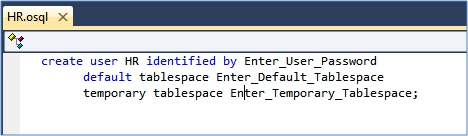
When we open the HR schema’s file, it displays the following script:

The reason I am bringing this is because it explains why “Move to schema” refactoring has not been implemented. A schema in Oracle is a user, not the same abstraction layer as found in SQL server.


To be continued…

In my next articles on the topic, I will talk about data and schema comparison as well as schema deployment. Stay tuned J!

Urban Turtle : scrum with Visual Studio ALM

Mario Cardinal, the host of the Visual Studio Talk Show, is quite happy these days. He works with the Urban Turtle team and they received significant support from Microsoft. Brian Harry, who is the Product Unit Manager for Team Foundation Server, has published an outstanding blog post about Urban Turtle that says: “…awesome Scrum experience for TFS.” You can read Brian Harry’s blog post at the following URL: http://urbanturtle.com/awesome.

DevTeach Montreal 2011 – Call for speakers

DevTeach will be back in 2011! And there will be a BI track this time! This means that we can have 5 sessions dedicated to BI during this event. If you would like to present at this event, just follow this link and you’ll be redirected to the DevTeach speaker registration web site.

Hope to see you there!

Christian

I presented at Vermont code camp

I had the pleasure to present for the second year in a row at Vermont Code Camp yesterday. I presented a session called “SSIS Advanced Concepts”. It was a level 300-400 session. The attendance was about 20 and they asked some very good questions. Fortunately for them, I had most of the answerJ! The presentation was focused on SSIS but when we talk about SSIS, we also talk about the underlying database. So, I could not resist talking about Visual Studio Database ProfessionalJ.

Burlington is a very beautiful city and we had nice weather yesterday. I love Vermont, it so nice driving there and enjoy beautiful landscapes!


Christian

Blog at WordPress.com.

Up ↑