
Unleashing the Power of Fabric Data Warehouse Copilot
Microsoft Fabric has introduced a groundbreaking AI assistant designed to revolutionize your data warehousing tasks: Fabric Data Warehouse Copilot. This innovative tool integrates seamlessly with your Fabric warehouse, providing intelligent insights and streamlining operations to enhance productivity.
This article is the first of a series of articles on the topic of Copilot integration with Microsoft Fabric.
Introduction to Fabric Data Warehouse Copilot
Fabric Data Warehouse Copilot is an AI assistant specifically designed to assist with data warehousing tasks. It leverages the power of generative AI to give intelligent insights, automate key aspects of data management, and enhance the overall efficiency of SQL developers and analysts.
Key Features of Fabric Data Warehouse Copilot
- Natural Language to SQL: One of the standout features of Copilot is its ability to generate SQL queries using simple natural language questions. This feature allows users to interact with their data warehouse in a more intuitive and user-friendly manner.
- Code Completion: Copilot enhances coding efficiency by providing real-time, context-aware code completions directly in the SQL query editor. This feature helps reduce errors and speeds up the development process.
- Quick Actions: Copilot offers quick actions such as “Fix” and “Explain” for SQL queries. These actions allow users to quickly address errors and understand their queries better, making the development process smoother and more efficient.
- Intelligent Insights: Copilot provides smart suggestions and insights based on the warehouse schema and metadata. This feature helps users make informed decisions and optimize their data management processes.
- Chat Pane: Users can ask questions to Copilot through the chat pane using natural language. Copilot responds with generated SQL queries or natural language explanations based on the questions asked.
This article will focus on the natural language to SQL mainly and the code completion features.
Prerequisites
Here is a short list of what is needed to use copilot with a data warehouse in Fabric:
- A Fabric capacity with a F64 size or more.
- The trial Fabric capacity will not work
- You need to sign up to get access to Copilot with Fabric Data Warehouse
- A Fabric data warehouse
- Tenant switch enabled in Fabric Tenant settings
The data model
I created a data warehouse for this article series to show how code completion can help with all the functionalities. I designed in a star schema format, originating from the AdventureworksLT database. Here is the model:

Very important: I defined all the foreign key relations as they help Copilot to better understand the data model and returns better results.
Natural language to SQL
This data model looks nice, but it is missing role-playing dimensions for the various date columns in the FactOrders table:
- IDDueDate, we’ll create a view on top of the DimDate dimension called DimDueDate
- IDOrderDate, we’ll create a view on top of the DimDate dimension called DimOrderDate
- IDShipDate, we’ll create a view on top of the DimDate dimension called DimOrderDate
To create those views, I opened a new SQL query window in Fabric and types the next command:
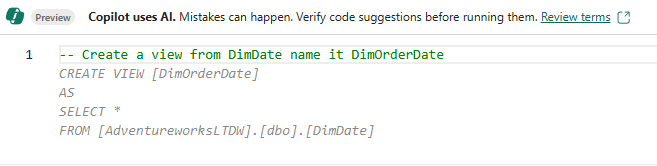
Copilot generated a preview (in gray) and I saw what SQL statement should be issued. I didn’t like the “SELECT *” in the SQL statement. So I was more precise in my second try and asked Copilot to avoid using the “SELECT *” in the code to be generated:

The generated SQL looked better but I didn’t like the format of the code, every column on a single line. I tried to be more specific again and my 3rd try was quite successful:
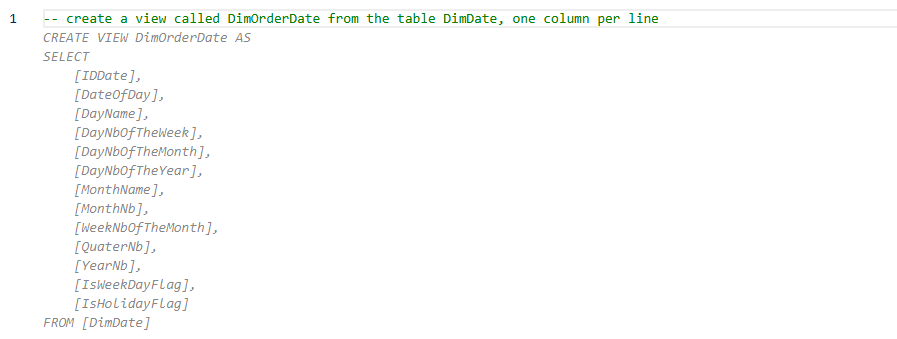
I am not a big fan of using the dbo schema in SQL. So, I asked Copilot to create a schema called “Enriched”:

For fun, I tried to be even more precise, I told Copilot to alias the DimDate table and rename the IDDAte column:
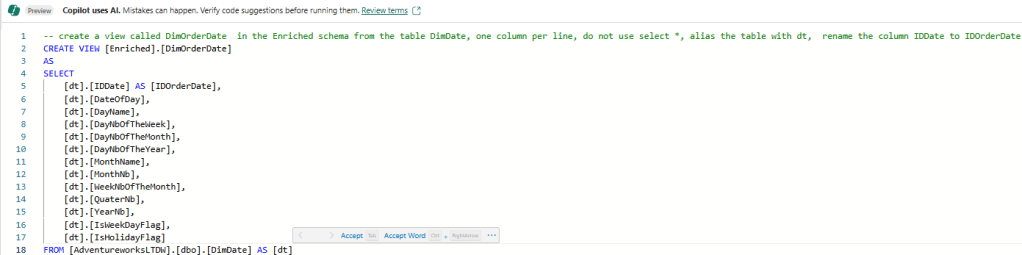
I accepted the result this time. I repeated the same process for the two other view. Here’s a screenshot of the final model.

If you are new to a data model like that one (even if it’s simple), Copilot can be used to describe the data model. I opened another SQL query pane, and I typed the next command:
— create a description for all the database objects

Using the Code Completion feature
As mentioned in the above section, I am not a big fan of the dbo schema. But all my tables were created in it. So, I decided to use code completion to make me more productive in that area. The syntax to move table from dbo to my Enriched schema is the following:
ALTER SCHEMA Enriched TRANSFER dbo.<my table>;
In a query pane, I started typing the command for the first table that I wanted to transfer. It didn’t work as intended at first. But Copilot learned what I wanted to do after a few attempts, and I got the following help from it:
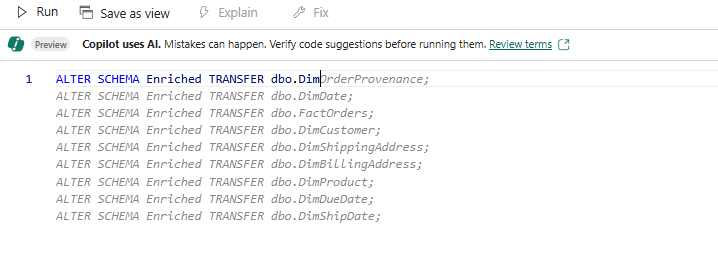
I accepted and cleaned up the code as not every tables/views needed to be transferred. But again, Copilot was a great helper here.
I then tried to create a stored procedure that return the result of all my tables joined:

Interestingly, a query was created instead of a stored procedure 😊. The result is not perfect but good enough to get me started with a stored procedure creation.
Maximizing Productivity with Copilot
The few examples of this article demonstrated how Copilot can make the next personas more productive:
- The data analyst
- Understand and document the database content
- Create queries using natural language
- The data architect to create database objects, move and rename database objects
- The TSQL developer can use it to create queries and use them in stored procedures or functions.
Conclusion
Fabric Data Warehouse Copilot, while still in public preview, will become a powerful AI assistant that can transform the way we manage our data warehouse. By leveraging its natural language to SQL capabilities, code completions, we can streamline our data warehousing tasks and boost productivity.
Whether you’re a seasoned SQL developer or a business analyst, Copilot is here to help you unlock the full potential of your data warehouse. I will write a few other articles on Copilot with Fabric Data Warehouse to fully experiment and explain the various features. I will certainly come back to the code completion and show more of it from a TSQL developer perspective as the product evolve and gets better.
 ETL/BI-blogger
Leave a comment